How QR Control works
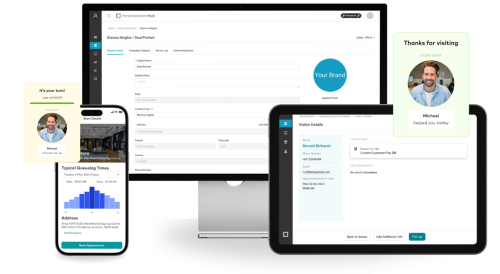
QR Control lets a customer connect their phone to a store screen for a personalised experience kept in sync across both. You define a phantom zone and QR code on the display type, enable it on a display, then build QR Control campaigns.
When a customer checks in to a store, Personalisation Hub knows who they are, so it can surface the offers most relevant to that individual. QR Control goes a step further: it gets customers to interact with chosen screens in chosen sections of the store.
Once a customer connects their phone to a screen, that interaction opens a hyper-personalised experience between the customer and the retailer, brand or advertiser. Personalisation Hub seamlessly connects their on-site or app experience with the screen, so anything we know about the customer can personalise the digital signage, kept in sync with the mobile store site on their phone. See Why use QR Control: for retailers, brands and advertisers for the value to each party.
How it works
There are two parts: enabling QR Control on displays, and building the campaigns that use it.
A) Display enablement
- Define a phantom zone on the display type. The phantom zone sits outside campaign rotation, so anything placed in it stays on screen through every campaign transition.
- Activate and define the QR code within that phantom zone. The code changes dynamically.
- Once the phantom zone is activated on the display type, enable QR Control on an individual display.
- Once it is enabled on a display, visitors can scan the code, connect and interact with that display's QR Control campaigns.
B) Campaign
A QR Control-enabled campaign defines the experience on both the phone and the screen.
- Setting it up: QR Control is a touch-point on the campaign's Campaign Brief. The campaign must have either Website or Digital Signage enabled before you can switch it on. Switching it on sets the campaign's targeting rules automatically, so you do not build them by hand.
- Mobile site experience: the banner and call to action the connected visitor sees in the mobile store site carousel. The carousel changes when a visitor connects to a screen, and shows that display's QR Control campaigns.
- Screen experience: when the visitor taps the call to action, the campaign plays on the screen itself, as an educational, brand awareness or interactive experience. At the same moment, the pop-up message you defined is shown on the phone.
Why it matters
Personalisation and decisioning already narrow what plays on a display to the customer in front of it, for example from 100 possible campaigns to the 3 most relevant. QR Control lets the customer engage with the one that matters to them, capturing their actual intent: the exact colour, model or service.
That intent carries into the handover. Staff can see which QR Control campaign the visitor engaged with, so the conversation starts from what they want and average handling time falls.
What QR Control is not
QR Control is not a kind of triggered campaign, and it does not decide what plays in a display's normal rotation. It is a separate touch-point layered onto a campaign already running through another touch-point. See How campaigns work: playback strategies, touch-points and status for how they fit together.
Related
Last updated 4 November 2026